Do You Even #Hashtag?
If you’re not familiar with them, you might at first mistake them for typos in a hasty Tweet or Facebook update. What else could explain the random number signs thrown in willy nilly? Either the producer of this content was all thumbs, or they clearly didn’t believe in proofreading before posting. These seemingly accidental pound signs, otherwise known as “hashtags,” are actually intentional and can be quite helpful in making social media updates visible to a larger audience. Before you jump on the hashtag bandwagon, however, there are a couple of things you should know about how and where to use these keyword tags most effectively.
#Please #Don’t #Do #This. #AndDontDoThisEither.
Different social media platforms have varying guidelines for how to incorporate hashtags in a post. Let’s use Twitter to illustrate this: If Joe Schmoe the HVAC contractor is crafting a tweet about how to save energy during the summer, the hashtag-less version might be:

This in itself is a perfectly acceptable tweet, but if you could use a free tool to expand your reach, why wouldn’t you? That’s where the humble hashtag comes in. Take a look at the new and improved tweet:
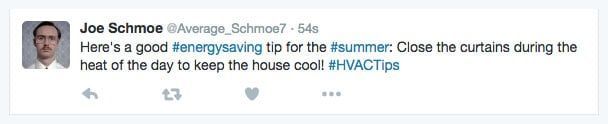
Now Joe Schmoe’s update is more searchable for Twitter users who might be looking for information about the hashtagged topics, meaning his business is ultimately getting more attention than it would otherwise. He also used an appropriate number of hashtags—two to three of them in one post is an ideal amount. Is there a wrong way to use hashtags? Of course! It looks like this:

Some of those hashtagged words are completely irrelevant to the HVAC industry. “The”? “Close”? Another blunder that many people tend to make is forming long strings of words into hashtags. For example: #BeSmartDontKeepYourCurtainsOpenWhenItsHotOut. Not only does this look ugly, it’s highly unlikely that someone is going to type out such a specific and long-winded search entry. Avoid mile-long hashtags at all costs.
Facebook and Google Plus have similar guidelines, but research is finding that hashtags are more effective on Twitter and Instagram. For this reason it’s best to use only one or two in Facebook posts and to avoid positioning them awkwardly in the middle of sentences—it’s usually a good idea to place them at the conclusion of the status. #EndStrong
Find Out What’s Trending!
If you’re on Twitter, you’ll see a list of trending hashtags on the left side of the main page, while Facebook shows a list of trending topics on the right side of the newsfeed. If you find a trending hashtag that is relevant to your company, use it! Let’s go back to Joe Schmoe and see how he takes advantage of a hot topic (pun intended):

Joe works in the HVAC industry; if “#HeatWave2016” is trending, that’s definitely a hashtag he should be using. Since this topic is being widely searched and discussed on social media, the chances that his tweet will reach a large audience have just been boosted dramatically. See how staying on top of trends works in your favor?
Wield Them Wisely
Now that you have a handle on hashtags, feel free to try them out! See what current events, people, or topics are trending and incorporate them into your posts if they’re relevant to your business. Don’t go overboard and turn your tweet into a hashtag hurricane, and avoid creating lengthy, sentence-like hashtags that just look awkward. That little pound sign can be a great way to increase the visibility of your Facebook, Twitter, Instagram, and Google Plus updates. Happy hashtagging!
The post Do You Even #Hashtag? appeared first on GetPhound.